> For the complete documentation index, see [llms.txt](https://wiki.loremachine.world/the-lore-machine-user-manual/llms.txt). Markdown versions of documentation pages are available by appending `.md` to page URLs; this page is available as [Markdown](https://wiki.loremachine.world/the-lore-machine-user-manual/how-2-lore/creating/create-a-lore.md).
# Create a LORE
Lore Machine’s new story set-up makes bringing your imagination to life feel like a game.
#### How it works
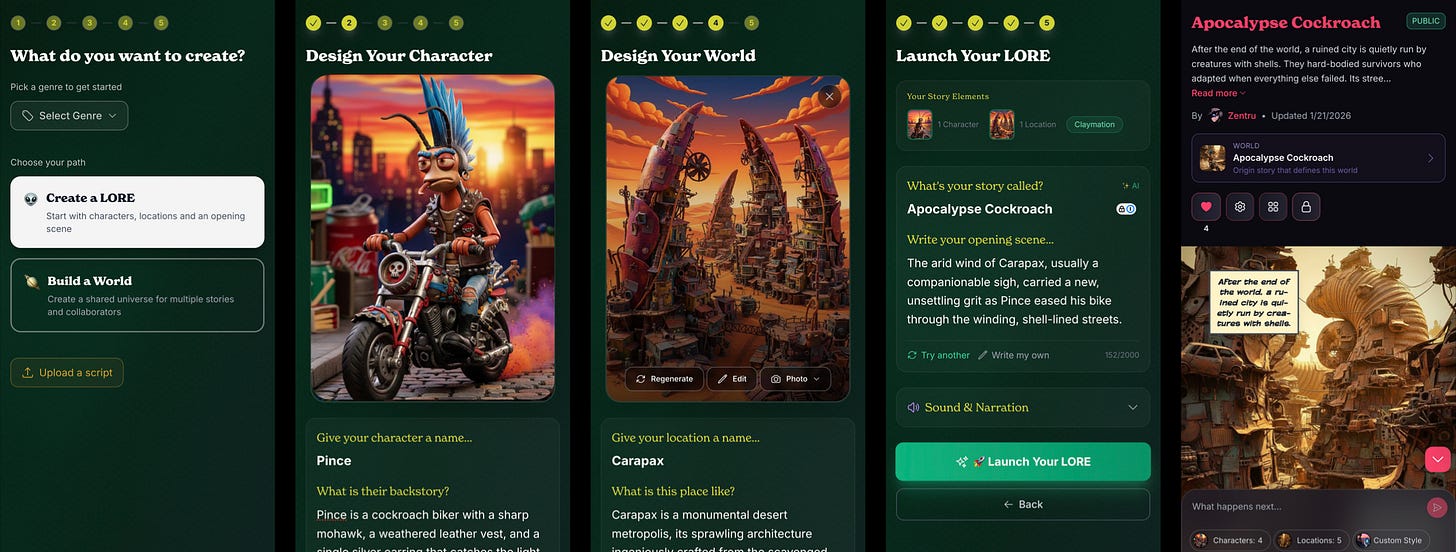
* Click Create a New LORE on the homepage
* Select Create a LORE
* Generate a Character: Describe you character and then generate. You can even make the character yourself! Once done, you can create more characters or move to locations.
* Establish a Setting: Here you'll build your first location. You can build multiple locations
* Story Overview: We've filled in some LORE details to get your ideas going. You can edit your title and LORE description. You can also choose your narrator voice and display mode. If you don't know yet, don't worry - you can always change this later.
Once you click Launch My LORE you will be taken to a full bleed screen, that gives you an overview of your story complete with audio narration.
You are ready to start Playing Your LORE!